Free Range Routing (FRR) Border Gateway Protocol ,Use case for Metal LB load balancer project
In my recent blog on Metal LB , we explored the deployment of the load balancer for offline premise datacentre . Metal LB creates Kubernetes services of type LoadBalancer in clusters. There are 2 modes to achieve this. Layer 2 mode (ARP/NDP) and BGP mode. Today, we will be delving into the world of Free Range Routing (FRR), Border Gateway Protocol implementation, as I have implemented this on a few 5G CNF deployments. Let’s take a closer look and understand what happens under the hood, how Metal LB implements BGP as a routing protocol, to accomplish efficient load balancing.
FRR is an open source software suite that provides a robust and flexible routing solution for networks. It supports various routing protocols such as OSPF, BGP, IS-IS, and RIP running protocol daemon.
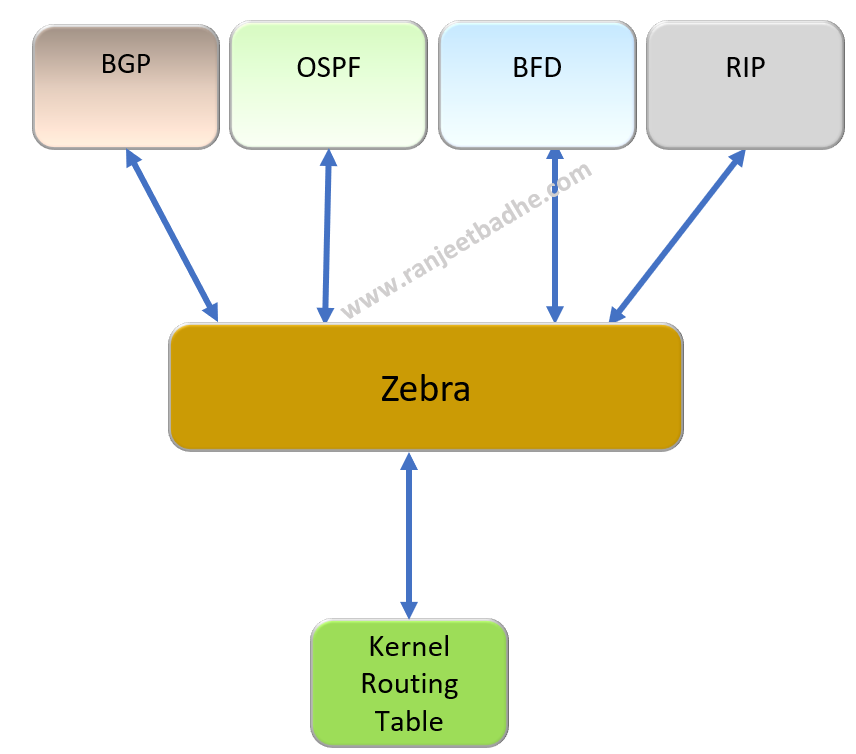
MetalLB uses FRRouting when working in BGP mode. It cleverly uses the BGP property of ECMP (Equal Cost Multi-Path) to load balance.the external traffic across various pods. BFD protocol along with BGP enhances the speed of failure detection. BGP speakers running on the nodes of Kubernetes cluster peers with the external router of the Data center ,where spine/Leaf traffic also routes the traffic.
Now let’s look at the basic deployment and working of FRR, our topic for today.
My lab setup is pretty straight forward. I have Centos 7.9 server running on which I am running FRR application. I also have a physical Cisco 2600 hardware router which is peering with FRR BGP instance running on Centos.
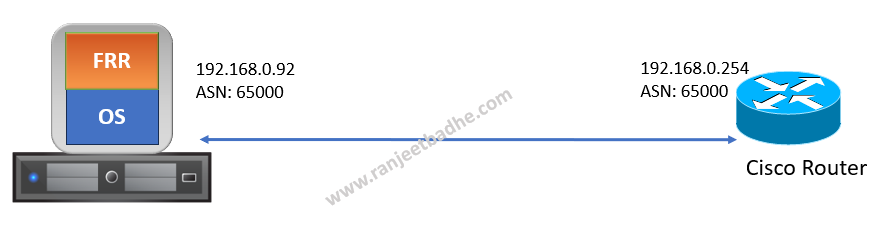
Download the FRR RPM and install.
root@nodeexporter ~]# curl -O https://rpm.frrouting.org/repo/$FRRVER-repo-1-0.el7.noarch.rpm
  % Total    % Received % Xferd  Average Speed   Time    Time     Time  Current
                                 Dload  Upload   Total   Spent    Left  Speed
100 15484  100 15484    0     0  13721      0  0:00:01  0:00:01 --:--:-- 13726
[root@nodeexporter ~]# ls -ltr
total 9248
-rw-------. 1 root root    1513 Apr 20  2023 anaconda-ks.cfg
-rw-r--r--  1 root root   15484 Oct 26 11:57 frr-stable-repo-1-0.el7.noarch.rpm

[root@nodeexporter ~]# sudo yum install ./$FRRVER*
Loaded plugins: fastestmirror
Examining ./frr-stable-repo-1-0.el7.noarch.rpm: frr-stable-repo-1-0.el7.noarch
Marking ./frr-stable-repo-1-0.el7.noarch.rpm to be installed
Resolving Dependencies
--> Running transaction check
---> Package frr-stable-repo.noarch 0:1-0.el7 will be installed
--> Finished Dependency Resolution
Running transaction Installing : frr-stable-repo-1-0.el7.noarch Verifying : frr-stable-repo-1-0.el7.noarch
Installed: frr-stable-repo.noarch 0:1-0.el7
Complete!
[root@nodeexporter ~]# yum install frr frr-pythontools
Loaded plugins: fastestmirror
Installed: frr.x86_64 0:9.0.1-01.el7 frr-pythontools.x86_64 0:9.0.1-01.el7
Dependency Installed: c-ares.x86_64 0:1.10.0-3.el7_9.1 libtirpc.x86_64 0:0.2.4-0.16.el7 libyang.x86_64 0:2.1.80-1.el7 pcre2.x86_64 0:10.23-2.el7 protobuf-c.x86 python3.x86_64 0:3.6.8-19.el7_9 python3-libs.x86_64 0:3.6.8-19.el7_9 python3-pip.noarch 0:9.0.3-8.el7 python3-setuptools.noarch 0:39.2.0-10.el7
Complete!
Edit the daemons file and enable BGP, OSPF and BFD by changing it to yes. and restart the frr service.
cat /etc/frr/daemons
bgpd=yes
ospfd=yes
ospf6d=no
ripd=no
ripngd=no
isisd=no
pimd=no
pim6d=no
ldpd=no
nhrpd=no
eigrpd=no
babeld=no
sharpd=no
pbrd=no
bfdd=yes
fabricd=no
vrrpd=no
pathd=no
root@nodeexporter ~]# systemctl restart frr
[root@nodeexporter ~]# vtysh
For console login use the command vtysh
Hello, this is FRRouting (version 9.0.1).Copyright 1996-2005 Kunihiro Ishiguro, et al.
nodeexporter.ranjeetbadhe.com# show running-configBuilding configuration...
Current configuration:!frr version 9.0.1frr defaults traditionalhostname nodeexporter.ranjeetbadhe.comlog syslog informationalno ip forwardingno ipv6 forwarding!
Cisco users will find lot of similairity in CLI.
I ping to ensure that my physical cisco router is reachable.
nodeexporter.ranjeetbadhe.com# ping 192.168.0.254PING 192.168.0.254 (192.168.0.254) 56(84) bytes of data.64 bytes from 192.168.0.254: icmp_seq=1 ttl=255 time=1.09 ms64 bytes from 192.168.0.254: icmp_seq=2 ttl=255 time=1.12 ms64 bytes from 192.168.0.254: icmp_seq=3 ttl=255 time=1.05 ms64 bytes from 192.168.0.254: icmp_seq=4 ttl=255 time=1.07 ms--- 192.168.0.254 ping statistics ---4 packets transmitted, 4 received, 0% packet loss, time 3002msrtt min/avg/max/mdev = 1.052/1.086/1.129/0.049 ms
Here is my router configuration on FRR. Its pretty straight forward .
nodeexporter.ranjeetbadhe.com# show running-configBuilding configuration...
Current configuration:!frr version 9.0.1frr defaults traditionalhostname nodeexporter.ranjeetbadhe.comlog syslog informationalno ip forwardingno ipv6 forwarding!interface lo ip address 1.1.1.1/32exit!router bgp 65000 neighbor 192.168.0.254 remote-as 65000 ! address-family ipv4 unicast network 1.0.0.0/8 network 192.168.0.0/24 exit-address-familyexit
!end
Configuration on my physical Cisco router
NEWYORK#show running-configBuilding configuration...Current configuration : 1664 bytesversion 12.3service timestamps debug datetime msecservice timestamps log datetime msecno service password-encryptioninterface Loopback0 ip address 97.9.15.127 255.255.255.255!interface FastEthernet0/0 ip address 192.168.1.1 255.255.255.0 duplex auto speed auto!interface FastEthernet0/1 ip address 192.168.0.254 255.255.255.0 duplex auto speed auto!router bgp 65000 bgp log-neighbor-changes neighbor 192.168.0.92 remote-as 65000 ! address-family ipv4 neighbor 192.168.0.92 activate no auto-summary no synchronization network 97.9.15.127 mask 255.255.255.255 network 192.168.0.0 network 192.168.1.0 exit-address-family
!
Some verification commands
On Cisco Router
NEWYORK#show ip bgp summaryBGP router identifier 97.9.15.127, local AS number 65000BGP table version is 4, main routing table version 43 network entries using 303 bytes of memory4 path entries using 192 bytes of memory2 BGP path attribute entries using 120 bytes of memory0 BGP route-map cache entries using 0 bytes of memory0 BGP filter-list cache entries using 0 bytes of memoryBGP using 615 total bytes of memoryBGP activity 3/0 prefixes, 4/0 paths, scan interval 60 secs
Neighbor V AS MsgRcvd MsgSent TblVer InQ OutQ Up/Down State/PfxRcd192.168.0.92 4 65000 516 519 4 0 0 08:33:08 1NEWYORK#show ip int briefInterface IP-Address OK? Method Status ProtocolFastEthernet0/0 192.168.1.1 YES NVRAM up upFastEthernet0/1 192.168.0.254 YES NVRAM up upLoopback0 97.9.15.127 YES NVRAM up up
On FRR router
nodeexporter.ranjeetbadhe.com# show ip route bgpCodes: K - kernel route, C - connected, S - static, R - RIP, O - OSPF, I - IS-IS, B - BGP, E - EIGRP, N - NHRP, T - Table, A - Babel, F - PBR, f - OpenFabric, > - selected route, * - FIB route, q - queued, r - rejected, b - backup t - trapped, o - offload failure
B>* 97.9.15.127/32 [200/0] via 192.168.0.254, ens192, weight 1, 08:32:03B>* 192.168.1.0/24 [200/0] via 192.168.0.254, ens192, weight 1, 08:32:03
nodeexporter.ranjeetbadhe.com# show ip bgp summary neighbor 192.168.0.254
IPv4 Unicast Summary (VRF default):BGP router identifier 192.168.0.92, local AS number 65000 vrf-id 0BGP table version 3RIB entries 7, using 1344 bytes of memoryPeers 1, using 20 KiB of memory
Neighbor V AS MsgRcvd MsgSent TblVer InQ OutQ Up/Down State/PfxRcd PfxSnt Desc192.168.0.254 4 65000 522 519 3 0 0 08:36:18 3 1 N/A
Displayed neighbors 1Total number of neighbors 1
Thats all folks for now. We will explore the BGP implementation of Metal LB load balancer in an upcoming blog.